Free Real Estate Investment Calculator

Six ways to own this house.
It tells you which one pays.

Enter the property once. Calculizer runs a complete real estate investment analysis for flip, long-term rental, short-term rental, BRRRR, wholesale and house hack at the same time and puts the results side by side. Then every major figure opens to the equation that produced it, using your actual numbers.

or
Already have an account? Log In

Free. Not a trial and not a limited tier — the calculator itself never costs anything.
Already have a REILink account? Open the Calculizer.

Calculizer real estate investment analysis comparing six property strategies side by side
$0What the calculator costs
0Credits needed to run it
SixExits, off one set of inputs
Every figureOpens to its own equation
Real estate investment analysis

Enter the property once.
Compare six investment strategies.

Instead of using a separate investment property calculator for every strategy, enter the property once and let Calculizer run the major investment analyses together. The purchase price, repairs, after-repair value, financing, rents, taxes and the rest of the property assumptions go in a single time. Calculizer runs six complete investment analyses at once and compares the profit, the return, the capital required, the risk and the effort of each strategy in one place.

You are not choosing an exit strategy first and then trying to make the numbers support it. Instead of forcing one property through one predetermined strategy, Calculizer works as a real estate deal calculator: run the property, compare the exits, and let the numbers show which structure actually makes sense.

FlipBuy, fix, sell
RentalLong-term hold
Short-termNightly rate
BRRRRRefinance out
WholesaleAssign the contract
House hackLive in one unit
Watch it work

Click any result to see
exactly how it was calculated.

Four moments from one session on one property — a $360,000 purchase against a $475,000 after-repair value, with $40,000 of work. Step through them.

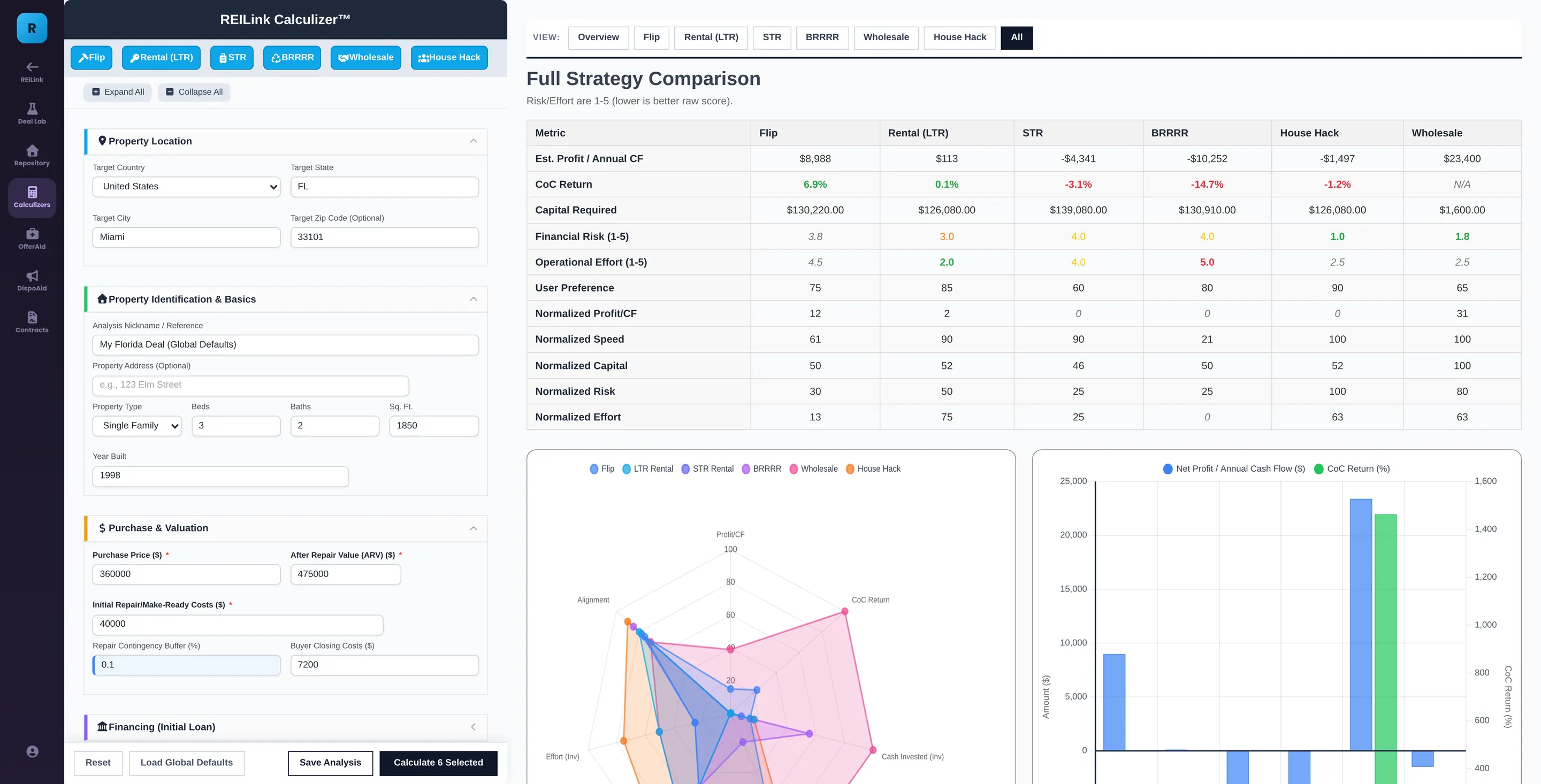
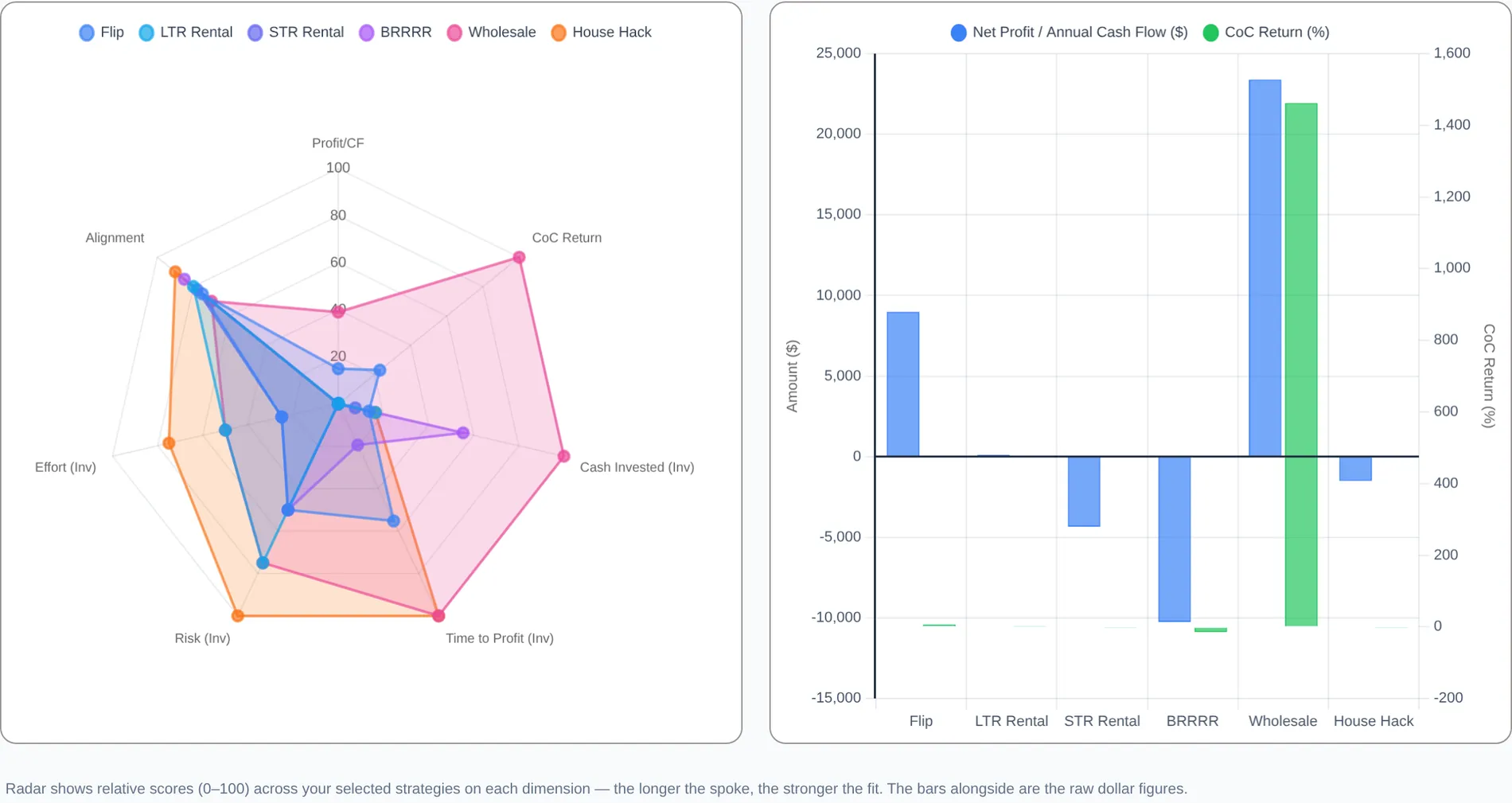
Six exits, off one set of inputs. Flip, rental, short-term, BRRRR, wholesale and house hack, ranked in one grid — with the ones that lose money shown losing money. The comparison, at the top of the results

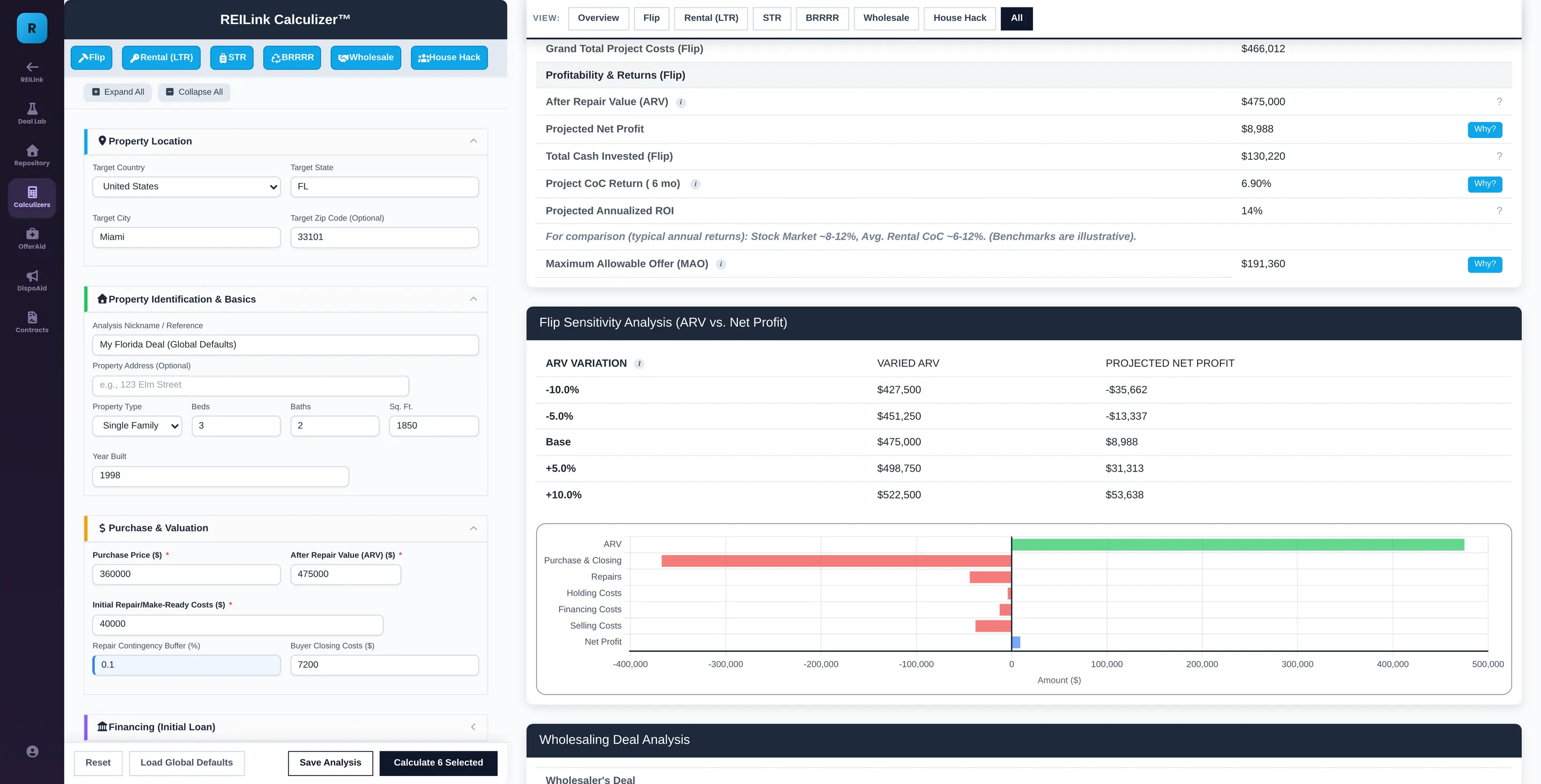
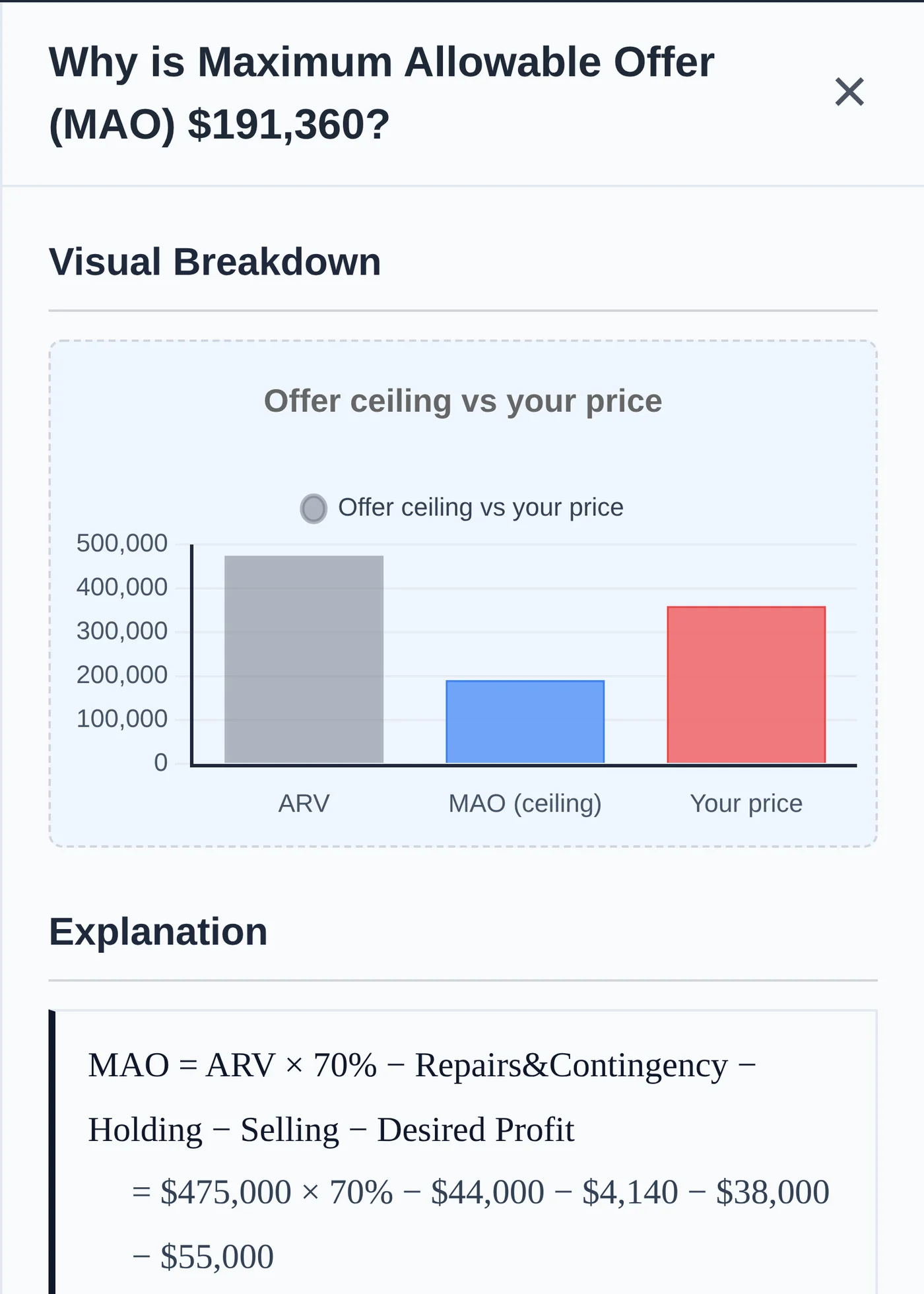
Press Why beside the maximum allowable offer. $191,360 — and the panel opens with the formula, your own numbers written into it, and the result. It recomputes at the moment you press, so it cannot disagree with the row. Flip table · the Why button on the MAO row

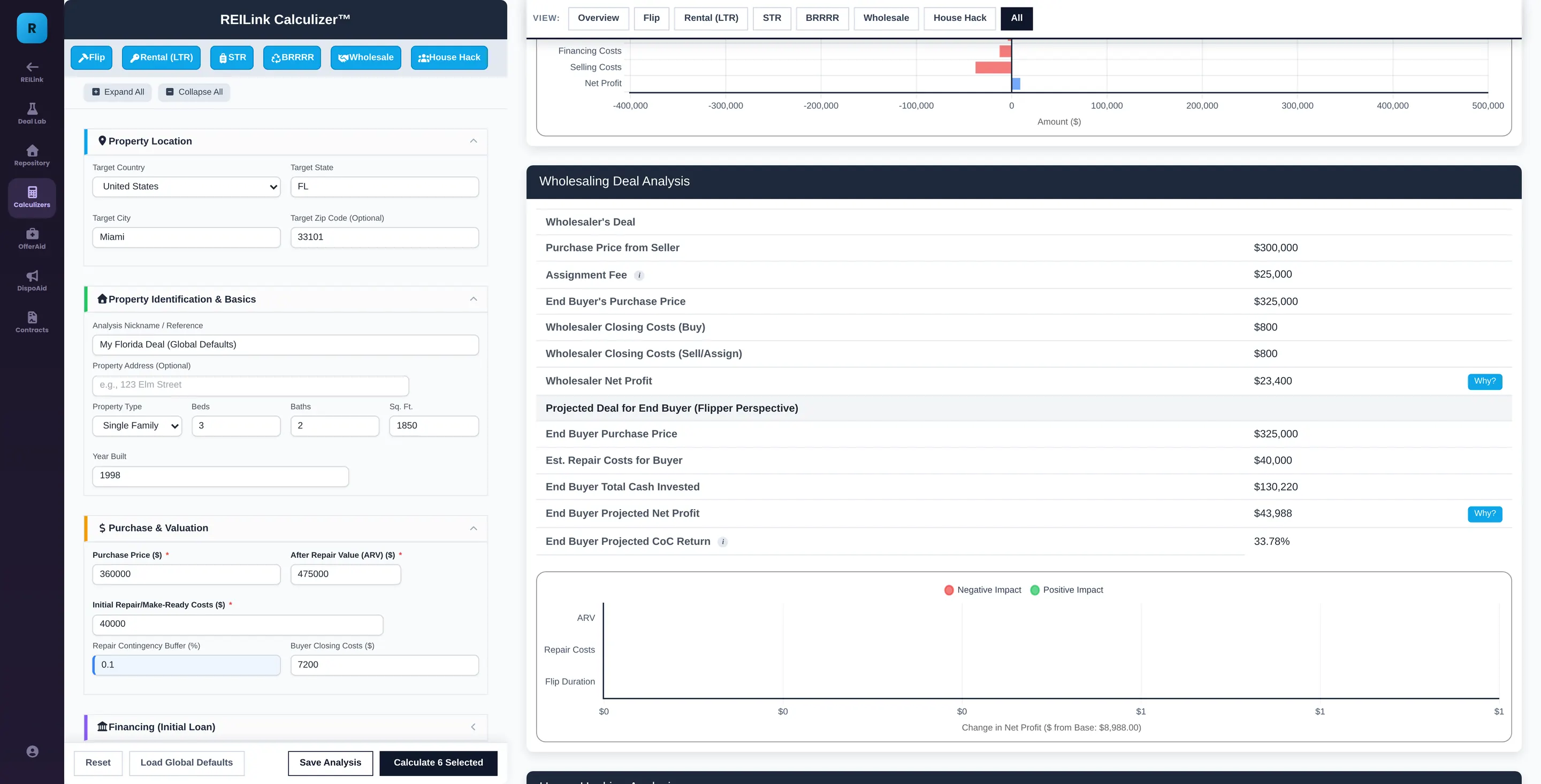
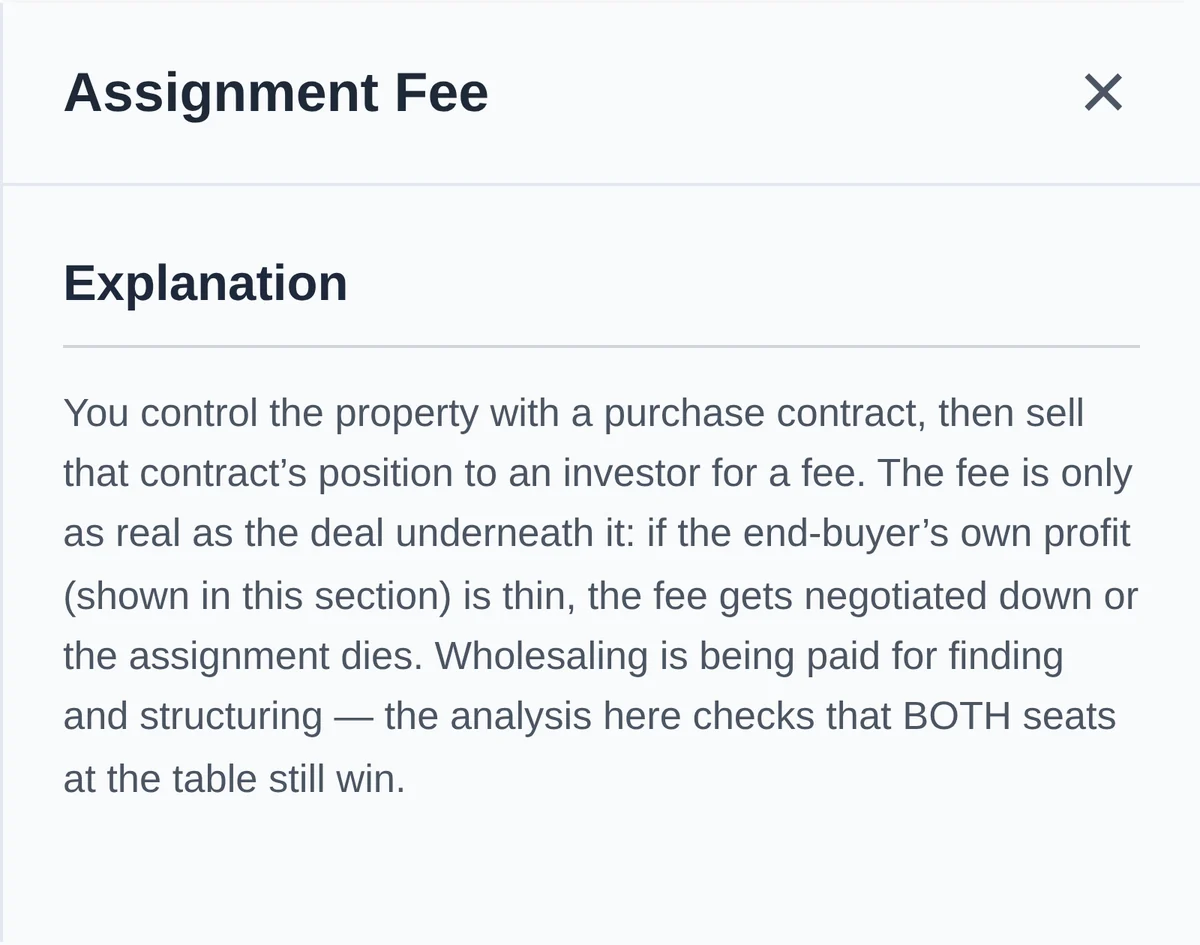
Press the marker beside Assignment Fee. The definition opens where you met the term — what it means, and the trap in it. Definitions never spend a credit; they are exempt in the code itself. Wholesale table · the glossary marker

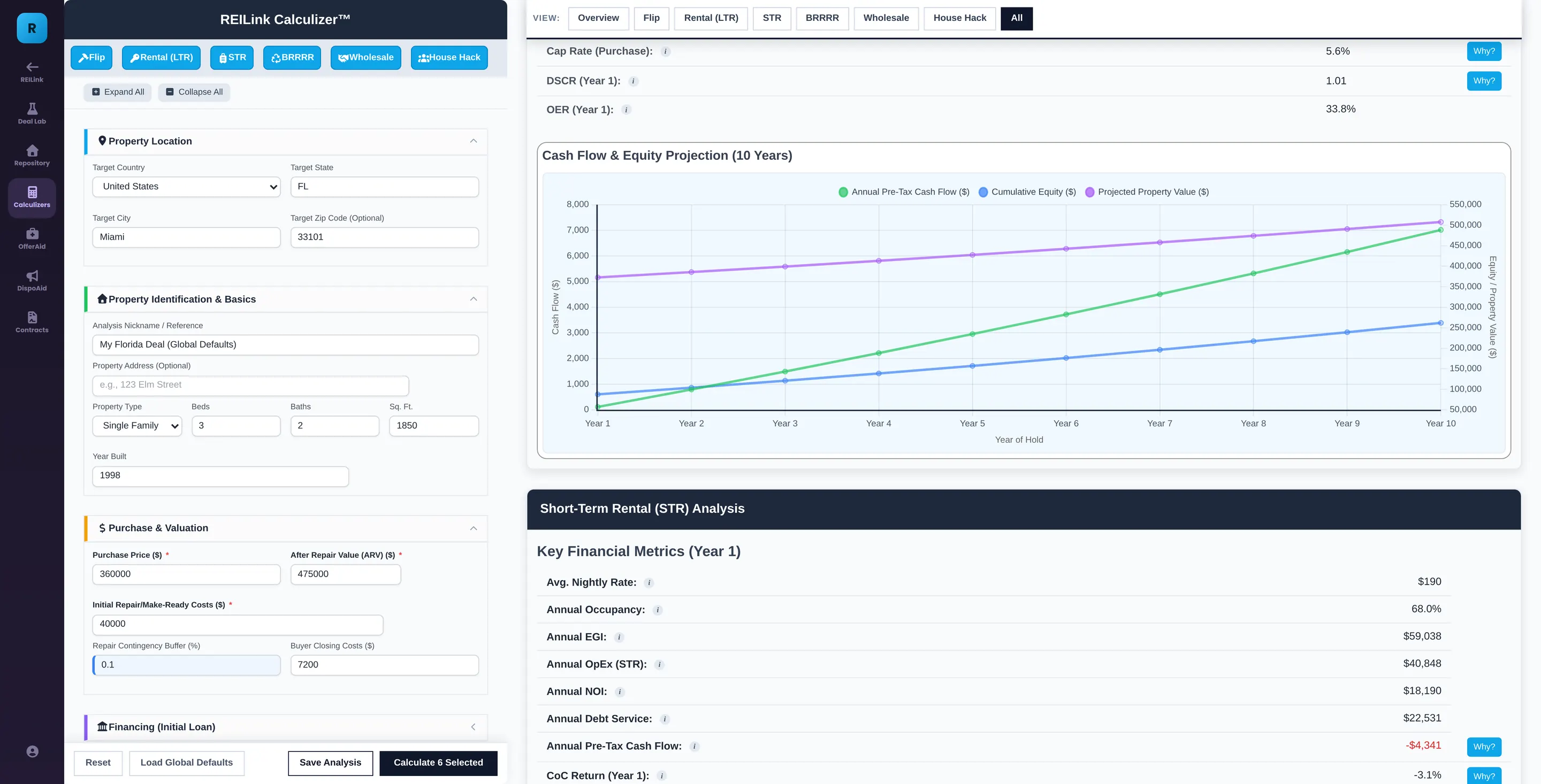
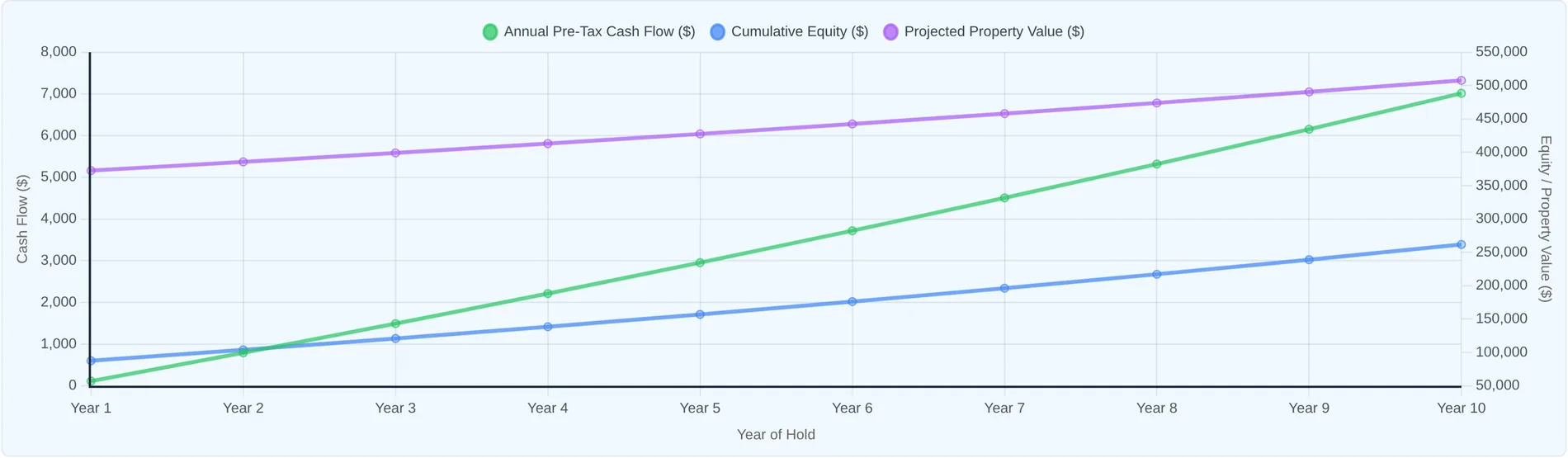
And the hold runs ten years, not one. Cash flow, equity and property value across the whole period, at your own growth rates, with the sale at the end priced however you think is honest. Rental section · the projection itself

The six strategies compared, ranked in one table The flip table, with a Why button beside the maximum allowable offer The wholesale table, with a glossary marker beside Assignment Fee The long-term rental section and its ten-year projection
The Why panel for maximum allowable offer: chart, formula, substitution, result and the levers that move it
The definition panel for assignment fee
The ten-year cash flow and equity projection
How do I know the number is right?

See the formula and your numbers
behind every result.

Most calculators give you a result and stop there. Calculizer lets you open the result and see the formula, the inputs from this property and the calculation that produced it. The panel recalculates from the current deal when you open it, so the explanation and the result stay tied to the same numbers.

Maximum allowable offer — what the panel prints
MAO = ARV × 70% − Repairs & Contingency − Holding − Selling − Desired Profit = $475,000 × 70% − $44,000 − $4,140 − $38,000 − $55,000 = $191,360

And then, underneath, in words: this is your walk-away ceiling. The price on the table was $360,000$168,640 above it. For that price to sit inside the rule, the after-repair value would have to reach $715,914 — and the panel tells you to believe that only if the comparable sales prove it.

Built at the moment you pressAssembled from the live inputs and the current outputs every time it opens. It is not possible for the explanation and the number above it to disagree.
Formula, then your numbers, then the resultThree separate lines, each its own block, every division drawn as a real stacked fraction. Not a paragraph describing the arithmetic — the arithmetic.
What moves itUnder the equation, the break-even: what the price would have to be, or the rent, or the down payment, for this number to become acceptable. Named in dollars, not in advice.
Drawn as well as writtenEach panel carries a chart of its own figure, so the relative size of each part is visible rather than merely stated.
The terms are defined in placeFinancial terms carry a marker. Rest on it for a line, open it for the formula and the benchmarks that separate a strong number from a weak one.
None of it spends a creditAll of this is computed from your inputs in your browser. No AI is involved in any part of it, so there is nothing to spend and nothing to run out of.

Losses stay visible

If the deal loses money,
Calculizer shows you.

Calculizer doesn’t try to make every property look like a deal. If a strategy loses money, the loss stays visible. If the cash flow is weak, you see it. If another strategy performs better, you see that too.

The point isn’t to confirm the strategy you already wanted to use. It’s to find out what the numbers actually support before you buy the property.

The spider chart comparing all six strategies, beside the dollar chart showing three strategies below the zero line.

Three strategies lose money on this property. Calculizer shows the losses instead of hiding them.

Ten-year projection

See how the property performs
over 10 years.

Year-one cash flow doesn’t tell you what happens over the life of the investment. Calculizer projects the property year by year for up to 10 years, including rent growth, expense growth, loan amortization, cash flow, property value, equity and the eventual sale. You can calculate the exit value from appreciation or an exit capitalization rate, then see both pre-tax and after-tax results, including depreciation, recapture and internal rate of return.

The whole table, year by yearGross rent, effective gross income, operating expenses, net operating income, debt service, principal paid, pre-tax and after-tax cash flow, closing loan balance, property value and equity.
See what happens when ARV or rent changesSee how flip profit changes as ARV moves, and how rental cash flow and returns change as rent moves.
After tax, at your ratesFederal and state, on income and on the gain, with the land share excluded from depreciation and recapture applied at sale.
Use your own growth and exit assumptionsIncome growth, expense inflation, appreciation, selling costs and the holding period are all yours to set, and every downstream number moves with them.
One entry, six analyses

One property.
Six real estate calculators.

Most real estate investment calculators answer one question at a time. A flip calculator tells you whether the property works as a flip. A rental property calculator tells you whether it works as a rental. A BRRRR calculator evaluates a BRRRR. Calculizer runs those decisions together — enter the property once and compare the major investment strategies without rebuilding the deal six different times. That makes it both a property investment calculator and a strategy comparison tool: the property stays the same while the exit changes.

Fix and Flip Calculator

Purchase price, rehab costs, contingency, financing and origination points, holding costs, selling costs, after-repair value, projected net profit and the most you can pay.

Rental Property Calculator

Rent, operating expenses, net operating income, cash flow, capitalization rate, cash-on-cash return, debt service coverage and ten years of equity and value.

Short-Term Rental Calculator

Nightly rate, occupancy, cleaning and platform fees, restocking, lodging tax, a furnishing reserve, and the return once all of it is paid.

BRRRR Calculator

Cash in for the buy and rehab, refinance at your loan-to-value, cash out, cash left in the deal, and how the property performs once it is stabilized.

Wholesale Real Estate Calculator

Purchase price from the seller, your assignment fee, closing costs on both sides — and the end buyer’s own profit and return, so you can see whether the fee survives their analysis.

House Hacking Calculator

Rent from the tenant units against the whole property’s costs: your net monthly living cost, and what you save against renting your own unit.

Then what are credits for?

The calculator is free.
Humphrey’s AI analysis is optional.

All six investment calculations, formulas, definitions and projections are free and do not use Humphrey credits. Credits are only used when you ask Humphrey to interpret the deal for you. Each AI feature has its own on/off switch, and a master switch can pause all three. A feature that is switched off never calls the AI, so it cannot spend a credit.

The bottom line on this deal

Reads all six strategies together and gives you a verdict: whether this is a deal, which single strategy fits best and the figures that make it the winner, and the biggest risk to watch. Three paragraphs, specific to your numbers.

Its own switch

Humphrey’s take

Sits at the bottom of a Why panel, underneath the calculator’s own working and never in place of it. Names the one thing in your figures driving that result, and the single most effective lever to change it.

Its own switch

Consolidate

The calculator flags weaknesses on its own, by rule. Consolidate rewrites that list into the five to seven that matter most for this deal, merged, ranked by impact and written in your numbers. The original list is kept and restored on any failure.

Its own switch
Humphrey's deal verdict card, with the credits notice and switch along the bottom.

Every Humphrey card carries the same footer: what it uses, the switch to stop it, and where to manage or buy credits. Nothing is hidden behind a menu.

Without a single credit$0
All six strategies, calculated in full

Flip, long-term rental, short-term rental, BRRRR, wholesale and house hack.

The comparison table and every chart

Including the spider across all six and the ten-year projections.

Every Why panel

Formula, your numbers, result, the levers that move it, and a chart.

Every definition

Hover and full-panel both, on every financial term in the results.

The rule-based weakness flags

Filtered by strategy, off the calculator’s own rules.

Sensitivity, after-tax and internal rate of return

The whole projection engine.

Saving the analysis

Kept against the property and reopened whenever you want it.

What credits addOpinion
A verdict across the six

Humphrey’s read on whether to do this deal at all.

A take inside a Why panel

The driver and the lever, on top of the calculator’s own working.

A consolidated flag list

The same warnings, prioritized and rewritten in your figures.

Turn Humphrey off and the page is identical apart from three missing paragraphs. Nothing recalculates, nothing is withheld, nothing greys out. That is not a promise about our intentions — it is how the code is built: the AI is a layer on top, and when it is off or unreachable it removes itself and leaves the calculator untouched. Every screen in the tour above was captured with it switched off.

Everything this real estate investor calculator computes

Everything the real estate
investment calculator calculates.

The six exits

  • Flip: total project cost, net profit, cash-on-cash return and the annualized figure
  • The most you can pay, on the percentage-of-value rule, with or without your desired profit taken out first
  • Long-term rental: effective gross income, operating expenses, net operating income, debt service, cash flow
  • Short-term rental: nightly rate, occupancy, cleaning, platform fees, restocking, lodging tax and a furnishing reserve
  • BRRRR: cash in, refinance at your loan-to-value, cash out, cash left in the deal, and how it performs afterwards
  • Wholesale: your fee, your closing costs on both sides — and the end buyer’s own profit and return
  • House hack: your net monthly living cost, and what you save against renting your own unit

The numbers behind them

  • Capitalization rate, cash-on-cash return, debt service coverage, gross rent multiplier, operating expense ratio
  • A ten-year table: rent, income, expenses, operating income, debt service, principal paid, cash flow, loan balance, value, equity
  • Internal rate of return, before tax and after
  • After tax at your own federal and state rates, with depreciation on the building and recapture at sale
  • Exit priced off appreciation, or off an exit capitalization rate — your choice
  • Sensitivity: net profit as the after-repair value moves, cash flow and return as the rent moves
  • A contingency buffer on repairs, origination points, and the holding costs that run during the rehab

How it behaves

  • A Why panel on every headline figure: formula, your numbers, result, levers, chart
  • A definition on every financial term, on hover and in full
  • Weakness flags raised by rule, filterable by strategy
  • A view bar to show one strategy at a time or all of them at once
  • Charts that redraw with the numbers, including the spider across all six
  • Save an analysis against the property and reopen it later
  • Runs in the browser. Nothing to install, nothing to keep up to date
Common questions

Real estate investment
calculator FAQ.

What is a real estate investment calculator?

A real estate investment calculator uses the purchase price, financing, income, expenses, repairs, projected property value and other assumptions to estimate how an investment property may perform financially. Calculizer goes further by running multiple investment strategies against the same property instead of requiring a separate calculation for each one.

What investment strategies can Calculizer analyze?

Six: fix and flip, long-term rental, short-term rental, BRRRR, wholesale and house hack. All six run from the same set of inputs and are compared side by side.

Is Calculizer a rental property calculator?

Yes. Calculizer includes a full long-term rental analysis — income, operating expenses, net operating income, debt service, cash flow and a ten-year projection. It also lets you compare that rental result against five other ways of structuring the same property.

Is Calculizer a BRRRR calculator?

Yes. BRRRR is one of the six strategies. You can compare the BRRRR outcome against flipping, renting, wholesaling, short-term rental and house hacking without re-entering the property.

Is Calculizer a fix and flip calculator?

Yes. It analyzes the property as a flip — including the maximum allowable offer — while also showing whether another strategy would produce a better result on the same numbers.

What real estate investment metrics does Calculizer calculate?

Across the six strategies it reports:

  • Cash flow, pre-tax and after-tax
  • Net operating income
  • Cash-on-cash return
  • Capitalization rate
  • Debt service coverage ratio
  • Gross rent multiplier
  • Operating expense ratio
  • Internal rate of return
  • Maximum allowable offer
  • Equity and loan balance by year
  • Projected property value
  • Sensitivity analysis

Is Calculizer free?

Yes. The calculator itself is free. Running the six investment analyses does not require credits, and neither do the equation panels or the definitions. Credits are only ever spent on Humphrey’s written opinion, which has its own switch and can be left off.

CALCULIZER

Enter one property.
Compare all six strategies free.

Run the property as a flip, rental, short-term rental, BRRRR, wholesale deal and house hack from the same set of inputs.

or
Already have an account? Log In

The calculator is free and stays free. Credits are only ever for Humphrey’s opinion, and you can leave him switched off.